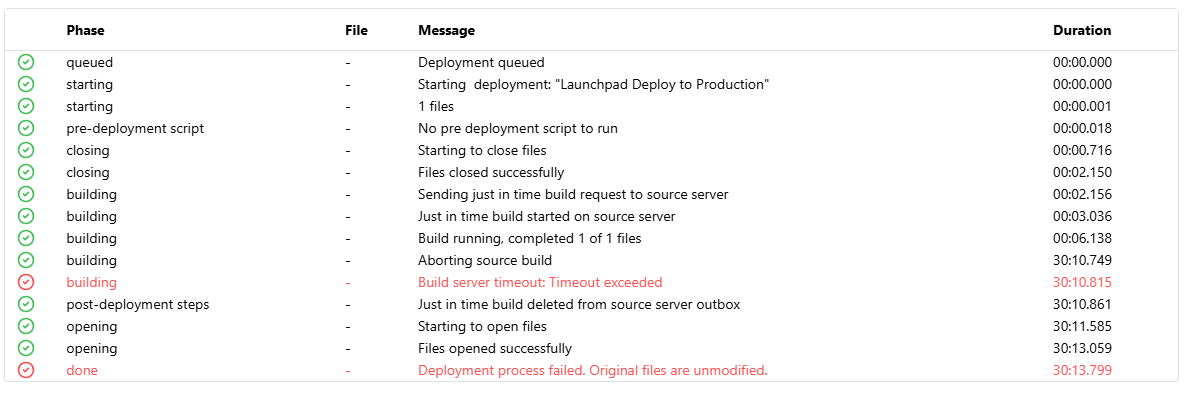
I’m trying a deployment that I have run in the past, but this time it keeps failing.
There are events in the log that show up complaining that authentication fails, but it refers to a database that has nothing to do with the deployment I’m running.
|2025-11-19 07:51:17.108 -0800|Information|518|atlas.sierrahardware.net|Administrator connected: admin [10.147.20.185] (fmsadmin).|
|---|---|---|---|---|
|2025-11-19 07:51:17.109 -0800|Information|738|atlas.sierrahardware.net|Database SAPLaunchpad being closed by admin...|
|2025-11-19 07:51:17.122 -0800|Information|168|atlas.sierrahardware.net|Database SAPLaunchpad closed.|
|2025-11-19 07:51:17.122 -0800|Information|520|atlas.sierrahardware.net|Administrator disconnected: admin [10.147.20.185] (fmsadmin).|
|2025-11-19 07:51:17.819 -0800|Information|518|atlas.sierrahardware.net|Administrator connected: admin [10.147.20.185] (fmsadmin).|
|2025-11-19 07:51:17.822 -0800|Information|520|atlas.sierrahardware.net|Administrator disconnected: admin [10.147.20.185] (fmsadmin).|
|2025-11-19 07:52:10.844 -0800|Warning|661|atlas.sierrahardware.net|SECURITY: Client richarda [127.0.0.1] authentication failed on database SierraHardware.fmp12 using richarda [fmxml].|
|2025-11-19 07:52:11.541 -0800|Warning|661|atlas.sierrahardware.net|SECURITY: Client richarda [127.0.0.1] authentication failed on database SierraHardware.fmp12 using richarda [fmxml].|
|2025-11-19 07:52:12.238 -0800|Warning|661|atlas.sierrahardware.net|SECURITY: Client richarda [127.0.0.1] authentication failed on database SierraHardware.fmp12 using richarda [fmxml].|
|2025-11-19 07:52:12.936 -0800|Warning|661|atlas.sierrahardware.net|SECURITY: Client richarda [127.0.0.1] authentication failed on database SierraHardware.fmp12 using richarda [fmxml].|
|2025-11-19 07:52:13.633 -0800|Warning|661|atlas.sierrahardware.net|SECURITY: Client richarda [127.0.0.1] authentication failed on database SierraHardware.fmp12 using richarda [fmxml].|
|2025-11-19 07:52:14.318 -0800|Warning|661|atlas.sierrahardware.net|SECURITY: Client richarda [127.0.0.1] authentication failed on database SierraHardware.fmp12 using richarda [fmxml].|
|2025-11-19 07:52:15.013 -0800|Warning|661|atlas.sierrahardware.net|SECURITY: Client richarda [127.0.0.1] authentication failed on database SierraHardware.fmp12 using richarda [fmxml].|
|2025-11-19 07:52:15.710 -0800|Warning|661|atlas.sierrahardware.net|SECURITY: Client richarda [127.0.0.1] authentication failed on database SierraHardware.fmp12 using richarda [fmxml].|
|2025-11-19 07:52:16.402 -0800|Warning|661|atlas.sierrahardware.net|SECURITY: Client richarda [127.0.0.1] authentication failed on database SierraHardware.fmp12 using richarda [fmxml].|
The correct database is SAPLaunchpad, the unrelated one is SierraHardware.
I did recently change my username in SierraHardware, so that is the incorrect username.
Two Questions:
- Why is my deployment of SAPLaunchpad failing and trying to authenticate to SierraHardware.
- Where is Otto getting this ‘richarda’ username from? I’ve updated the username everywhere, I thought. I don’t think I’m using Data API keys.