We have 2 Windows servers where OttoFMS was installed.
Both have valid SSL certificates from an internal CA.
When entering the licence key on one of the servers we continues to the login page as expected.
The other sever just gets the following error: License not accepted. Reason “missing”
The page https://edd-sl-proxy.geistgate.com/ is accessible.
In the otto-error.log we see the message “Error checking license self-signed certificate in certificate chain”.
According to the documentation we need to add this custom CA to the .env file.
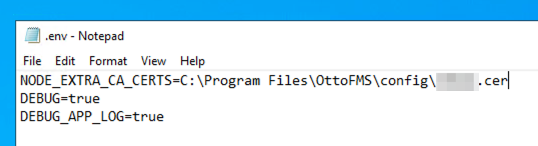
There is no .env file in OttoFMS/config after installation, so we create one ant put the NODE_EXTRA_CA_CERTS in there.
Restart the service and try again.
In the otto-error.log we still see the message “Error checking license self-signed certificate in certificate chain”.
So we add DEBUG=true to the .env file and check the otto-debug.log hoping to find more info but here we only see one error with again the “Error checking license self-signed certificate in certificate chain”.
Windows Server 2022 Standard
FileMaker Server 21.1.3
Sorry, this one must have fallen through the cracks. What did you put in the .env file? It should be a path to the .crt or .pem file.
Annoyingly I have just discovered an issue with the debug logging for the custom ca parts where it is not logging due to a different issue. I’ll get that issue fixed in our next version of OttoFMS so the debug logging will actually appear.