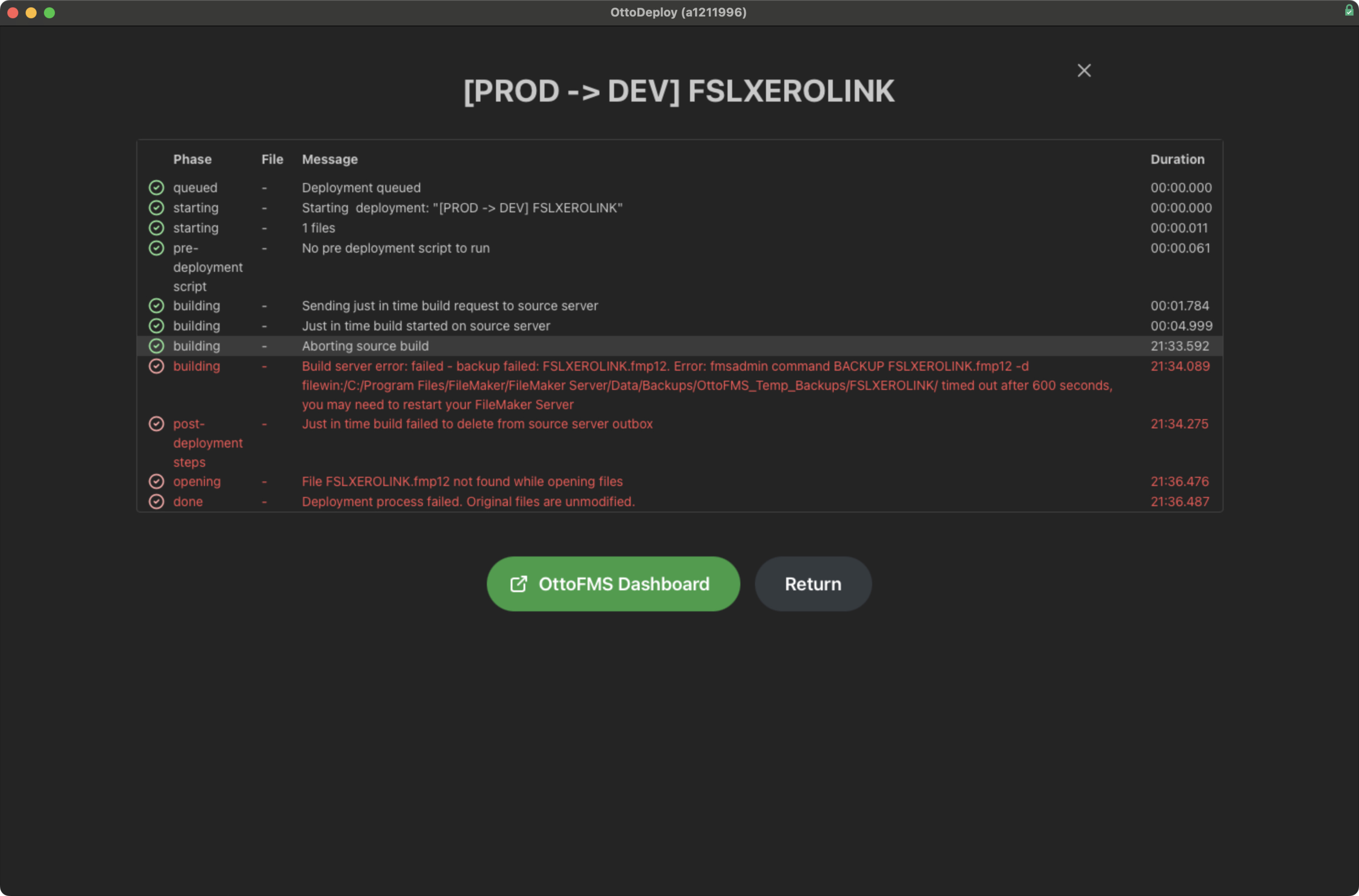
Hi, we have recently begun using Otto deploy and so far I’ve managed to move all of the files from Production over to our dev server except for two files…
These files initially were failing due to a lack of space on the server (I believe) but now we have increased it and it is still continuing to fail.
Please may someone who understands Otto Deploy help us debug this issue?
I have attached a screenshot of the error that appears within Otto deploy.
Welcome to the community and to OttoFMS! This error you’re seeing is happening when the source server attempts to create a backup of your file and it takes longer than 10 minutes. This could be because your server doesn’t have very much RAM or available CPU, or it could be because your FileMaker Server is borked (sometimes fmsadmin just decides to take a really long time for no reason). I would try completely restarting FileMaker Server on your source server and see if that helps.
If you want to make it easier to debug, you could also try running the build on your source server by itself. When running a deployment with a Just in Time build, most of the build logs are omitted from the deployment logs. If you make the build on your source server you can see the full logs as they run. You can also check the logs in the OttoFMS console for that deployment.
If you expect a backup of that file to take longer than 10 minutes for some reason (unlikely but possible I guess), you can override that timeout time using environment variables.