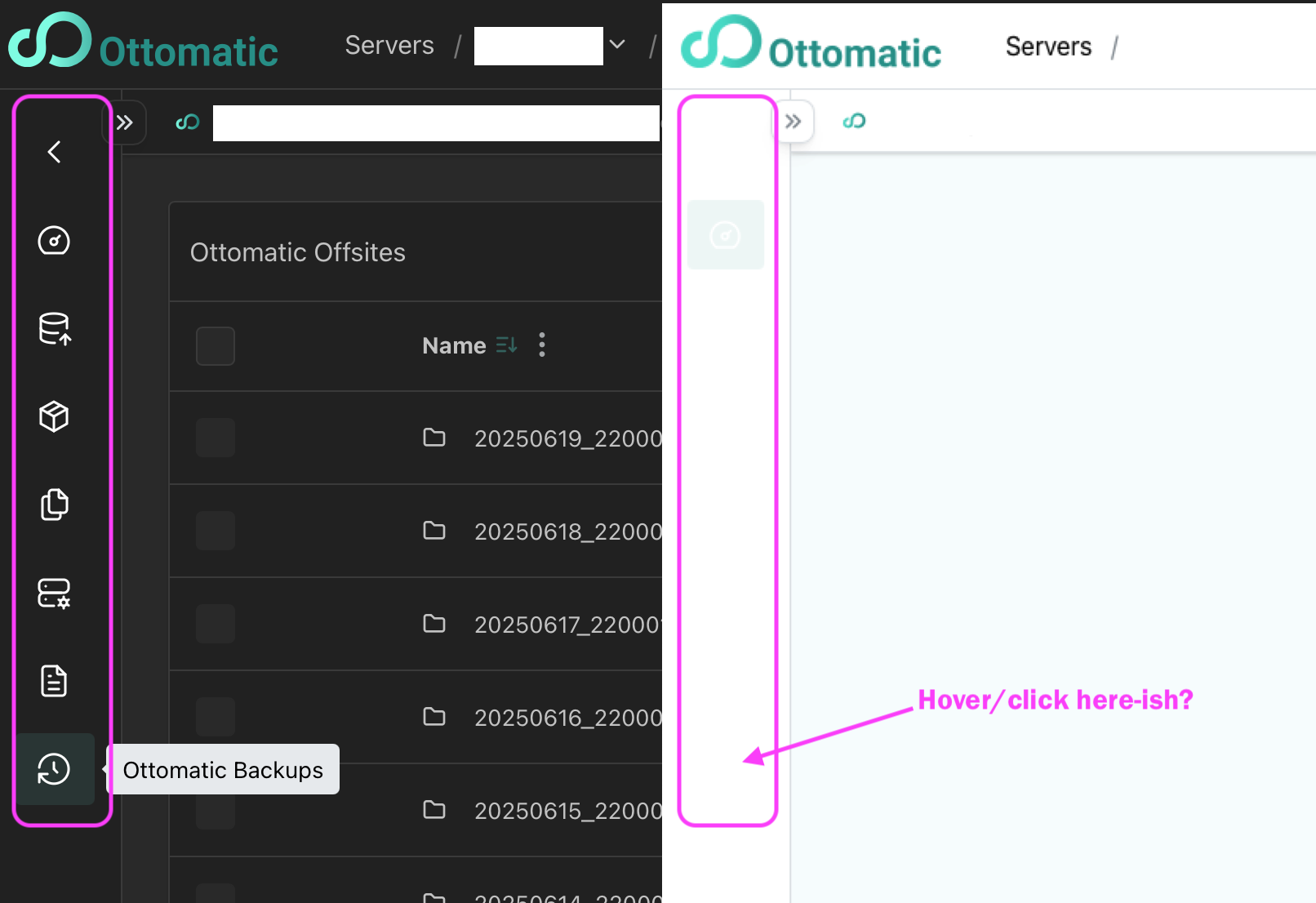
I was trying to direct a co-worker to something in the OCC with a server selected, and we just weren’t clicking. Then I noticed his screenshot… and the left side icons I was talking about were not visible. I use dark mode, and he uses light mode. In light mode, the “selected” icon is just faint enough to be barely visible, but the other icons are completely gone. In dark mode, they look good. Here are our 2 screen shots next to each other:
Thanks for the report, it looks like this is an issue if the Ottomatic Console is unable to load the theme color from OttoFMS. I’ll get this fixed. Thank you!
Thanks for taking the time to report this. I think it might be some caching issue. I can’t make it happen on my Mac with safari or chrome, yet but we will investigate it further.
In the meantime, it might resolve itself, if you quit safari and relaunch, or alternatively do a hard refresh on the browser.
To hard refresh Safari (Mac), use the keyboard shortcut Command + Option + R or hold down Shift while clicking the refresh button.
Kyle is definitely on the right track. This is a server that is behind a client VPN, so that completely makes sense. I just checked other servers with “normal” visibility, and those are fine in both light and dark modes.